
Understanding Ergonomics in Remote Workstations
What is Ergonomics?
Ergonomics is the science of designing work environments that fit the user’s needs to maximize comfort, efficiency, and safety. In the context of remote workstations, it means arranging your desk, chair, and devices so your body maintains natural alignment with minimal strain. Proper ergonomics reduce the risk of discomfort and musculoskeletal problems over time.
The Importance of Ergonomic Workstations for Remote Workers
With remote work becoming a norm, many spend extended hours at makeshift desks. Without ergonomic consideration, poor posture, repetitive strain, and fatigue are common. Prioritizing an ergonomic setup helps sustain productivity while lowering the chances of injury. It supports better focus and well-being throughout the workday.
Key Components of an Ergonomic Remote Workstation
Choosing the Right Chair
A supportive chair forms the foundation of an ergonomic workspace. Ideally, it offers adjustable height and lumbar support to maintain the natural curve of the spine. The seat should provide comfort without restricting movement. A stable base with smooth-rolling casters enhances mobility and posture consistency.
Desk Setup: Height and Space Optimization
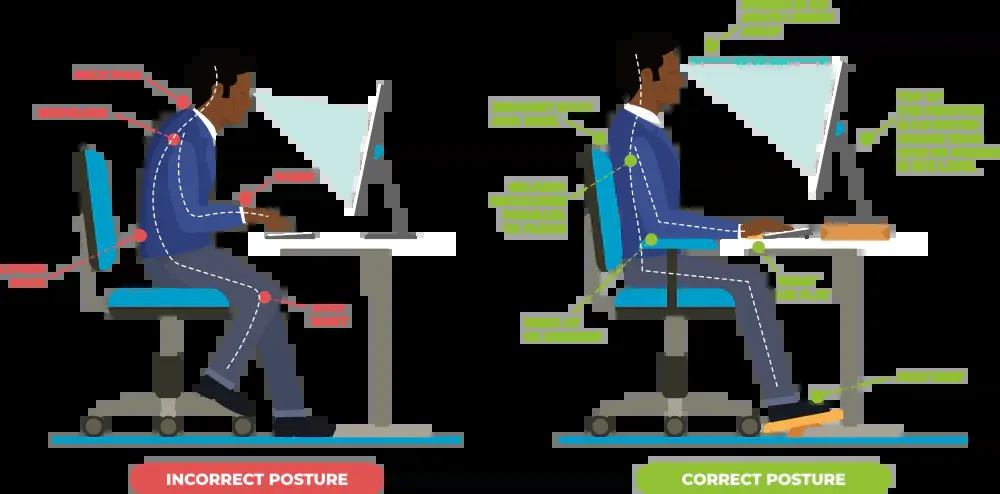
The desk height should allow your forearms to rest parallel to the ground when typing. A surface too high or low forces awkward arm and shoulder positions, increasing strain. Adequate space on the desk is also necessary to organize equipment without clutter, encouraging smooth, comfortable movements throughout the day.
Monitor Placement and Screen Settings
Position your monitor directly in front, about an arm’s length away, with the top of the screen at or slightly below eye level. This reduces neck bending and eye fatigue. Adjust brightness and contrast to comfortable levels and consider anti-glare screens to minimize eye strain during long hours of use.
Keyboard and Mouse Positioning
The keyboard and mouse need to be close enough so you can use them with relaxed shoulders and elbows bent around 90 degrees. Wrists should stay in a neutral position, avoiding excessive bending. Using ergonomic input devices can further reduce pressure points and improve comfort.
Step-by-Step Guide to Setting Up Your Workspace
Assessing Your Current Workspace
Begin by observing your current setup. Note any discomfort or awkward postures you naturally adopt. Identify areas needing adjustment, such as desk height or chair support. This self-assessment is crucial for making targeted improvements aimed at comfort and efficiency.
Adjusting Your Chair for Optimal Posture
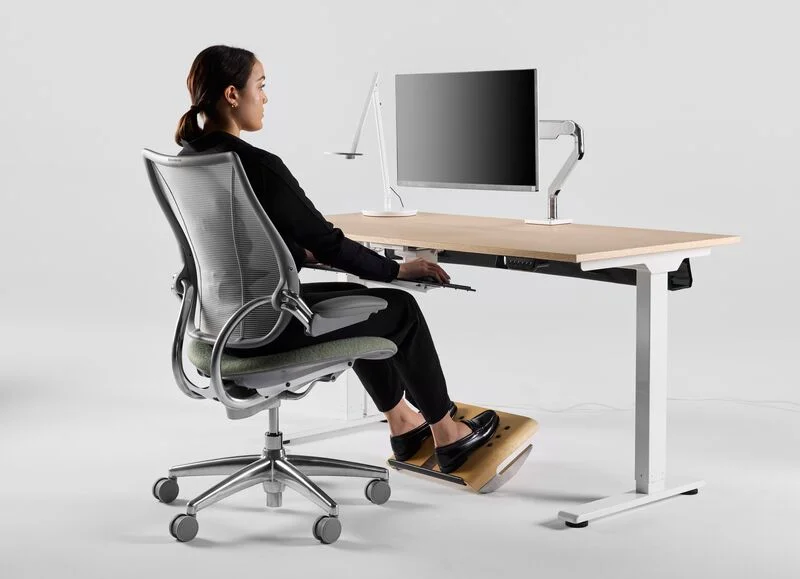
Raise or lower your chair so your feet rest flat on the floor or on a footrest. Ensure the backrest supports your lower back’s natural curve. The seat depth should allow 2-3 inches of space between the edge and the back of your knees. Adjust armrests to support your forearms without elevating your shoulders.
Positioning Devices for Maximum Comfort
Place your monitor, keyboard, and mouse according to ergonomic principles. Keep the monitor centered to avoid twisting your neck. Align the keyboard and mouse at an equal height and within easy reach. Organize cables and accessories to avoid clutter, allowing smooth arm movement.
Incorporating Ergonomic Accessories
Consider adding tools like footrests, monitor stands, or wrist rests if your primary furniture does not provide ideal adjustments. These accessories can help maintain proper posture and reduce stress on joints and muscles, especially if your workspace has fixed dimensions.
Daily Habits to Maintain Good Posture and Reduce Fatigue
Stretching and Movement Breaks
Incorporate short movement breaks every hour to counteract stiffness. Simple stretches targeting the neck, shoulders, and lower back can relieve tension. Standing and walking for a few minutes increases blood flow and refreshes concentration.
Proper Sitting Techniques
Sit with your back straight and shoulders relaxed. Avoid slouching or leaning forward. Keep your feet firmly planted and avoid crossing your legs for long periods. Regularly check your posture and adjust as needed to maintain ergonomic alignment.
Hydration and Nutrition Tips for Energy
Staying well-hydrated supports overall energy levels and muscle function. Keep water accessible and drink regularly throughout the day. Balanced meals with adequate nutrients further help sustain concentration and reduce fatigue during remote work hours.
Technology Tools That Support Ergonomics
Apps and Software for Posture Tracking
Certain applications remind users to take breaks, stretch, or adjust posture. These tools promote awareness about sitting time and encourage healthier habits. Regular prompts can significantly improve long-term comfort and reduce strain.
Wearable Devices to Monitor Activity
Wearables can track your movement and posture patterns, providing feedback to help correct poor positions. Some devices alert you when you’ve been sedentary for too long, encouraging activity and promoting ergonomic practices throughout the day.
Cost-Effective Solutions for Ergonomic Workstations
DIY Adjustments You Can Make Today
You can improve ergonomics with simple home solutions. Use books or sturdy boxes to raise your monitor height. Add cushions or rolled towels for lumbar support. Rearranging your workspace and organizing tools within easy reach can offer immediate benefits without expense.
Budget-Friendly Ergonomic Products Worth Considering
Affordable accessories like adjustable laptop stands, basic footrests, and ergonomic mouse pads enhance comfort without heavy investment. Prioritize items that address your biggest discomforts to maximize value and create a healthier remote workstation within your budget.
Conclusion: Long-Term Benefits of an Ergonomic Setup
Establishing an ergonomic remote workstation helps protect your body from the negative effects of prolonged sitting and repetitive movements. By optimizing your environment and habits, you support sustained productivity, reduced fatigue, and improved well-being. Investing time into proper setup now can prevent discomfort and promote a healthier work experience for the future.


