
Understanding the Importance of Screen Time Limits
In today’s digital age, managing the amount of time spent on electronic devices has become a critical concern for families and individuals alike. Excessive screen time can lead to various problems, including reduced physical activity, disrupted sleep patterns, and even impaired social interactions. Setting screen time limits is essential for promoting a balanced lifestyle that supports mental and physical well-being.
Moreover, with multiple devices in use across households, maintaining consistent screen time rules can prevent confusion and encourage healthier technology habits. When limits are clearly established and enforced, users, especially children, are more likely to develop responsible digital behaviors that carry into adulthood.
Preparation Before Setting Up Screen Time Controls
Assessing Device Types and Operating Systems
Before diving into setting screen limits, it’s important to understand the variety of devices involved. Different operating systems—iOS, Android, Windows, and macOS—offer distinct tools for managing screen time. Identifying which devices need control and their respective platforms ensures you use the appropriate features rather than applying a one-size-fits-all approach.
Failing to assess this upfront can lead to ineffective control or wasted effort on tools incompatible with certain devices. For example, Apple’s Screen Time works seamlessly with iPhones and iPads but doesn’t extend to Windows PCs, which require different management methods.
Gathering Necessary Permissions and Access
Managing screen time limits on multiple devices usually requires administrative access or parental control permissions. Without the right credentials, you won’t be able to implement restrictions or oversee usage reports. This is especially relevant in families where devices might belong to teenagers or other adults who have personal accounts.
Ensuring you have access to each device’s settings or relevant parental control apps beforehand prevents disruptions during setup. It also allows for smoother synchronization when managing limits remotely or across multiple users.
Step 1: Setting Screen Time Limits on iOS Devices
Using Built-In Screen Time Settings
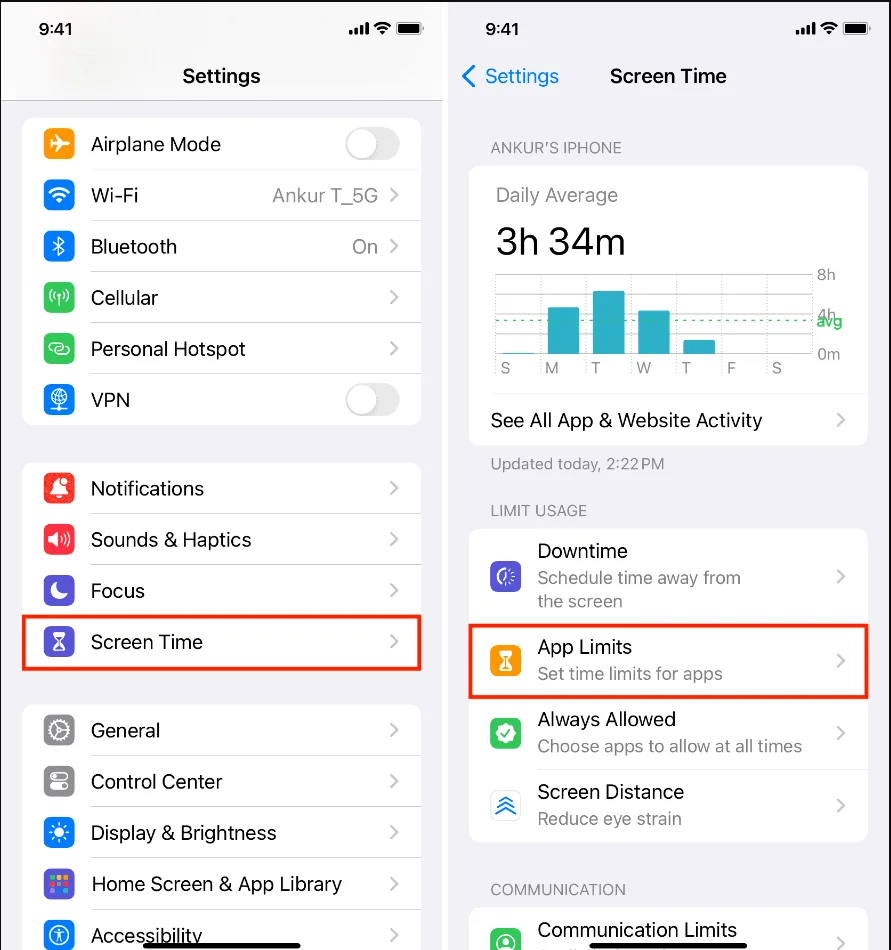
iOS devices come equipped with a built-in Screen Time feature that offers a straightforward way to monitor and limit device use. The problem many face is not knowing where to start or which settings to prioritize. To begin, open Settings and navigate to Screen Time, where you can enable restrictions and view daily usage summaries.
This feature also allows controlling individual apps, setting content restrictions, and scheduling downtime. The convenience of having integrated tools on iPhones and iPads eliminates the need for third-party apps, simplifying the management process.
Customizing Downtime and App Limits
Downtime sets periods when only certain apps or calls are accessible, which helps reduce distractions during meals, study sessions, or bedtime. App Limits provide a maximum daily usage duration for specific apps or categories, such as social media or games.
By customizing these controls to align with daily routines and priorities, families can effectively reduce excessive device use. It’s important to communicate these limits clearly, so users know when and why access is restricted, fostering cooperation rather than resistance.
Step 2: Configuring Screen Time on Android Devices
Google Family Link Overview
One challenge on Android devices is the diversity of manufacturers and versions, which makes a universal approach difficult. Google Family Link offers a practical solution for family screen time management by allowing parents to create Google accounts for children and set restrictions remotely.
This app provides scheduling tools, app activity monitoring, and device locking features. Without Family Link or similar tools, parents might struggle to enforce limits, leaving children exposed to unrestricted screen time.
Setting App Timers and Bedtime Schedules
With Family Link, you can assign daily time limits to individual apps, ensuring no single app dominates usage. Bedtime schedules allow devices to lock automatically during sleeping hours, encouraging healthier sleep patterns.
These settings are adjustable based on observed behavior, making it easier to adapt rules as children grow or as circumstances change. However, some Android devices may also offer native Digital Wellbeing features, which can complement or replace Family Link depending on the device model.
Step 3: Managing Screen Time on Windows and macOS Computers
Windows Family Safety Features
Computers present unique challenges due to their broader range of uses beyond entertainment, such as homework or work-related tasks. Windows Family Safety offers parental control features that include activity reporting, screen time limits, and content filters designed to protect younger users.
Without such controls, children may easily spend excessive hours on distracting websites or applications. Setting clear policies on computer use time and monitoring compliance through Family Safety helps establish a balanced routine that includes offline activities.
Using Screen Time on macOS
macOS includes a Screen Time functionality similar to iOS, allowing users to set app limits, schedule downtime, and view usage reports. Since many families use a mix of Apple computers and mobile devices, having comparable tools across systems enhances consistency.
Without awareness or use of these settings, users might unintentionally spend long hours on screens. Encouraging regular breaks and customizing settings to fit individual schedules can mitigate the risks associated with extended computer use.
Tips for Synchronizing Screen Time Limits Across Multiple Devices
Centralized Management Tools and Apps
One major obstacle in managing screen time is dealing with multiple platforms and devices, each with its own set of controls. Centralized management solutions, like Microsoft Family Safety or third-party apps such as Qustodio, offer unified dashboards to monitor and adjust limits remotely.
These tools help avoid inconsistencies where one device is strictly controlled while another is unrestricted, which can undermine overall effectiveness. Choosing a solution that works across devices simplifies the task of creating cohesive screen time policies.
Ensuring Consistency in Time Restrictions
Inconsistent rules across devices often confuse users and reduce adherence to limits. For instance, allowing extensive screen time on a tablet but restricting the smartphone might lead to shifting device use rather than reducing it.
To solve this, align screen time rules across all platforms as much as possible, setting similar limits on app categories and usage periods. Regularly communicating the reasons behind these limits ensures understanding and cooperation among all users.
Monitoring and Adjusting Screen Time Settings Over Time
Reviewing Usage Reports
Many screen time tools provide detailed usage reports, highlighting which apps or activities consume the most time. Ignoring these insights can result in ineffective limit enforcement, as you might restrict the wrong apps or overlook emerging habits.
Regularly reviewing these reports allows for informed decisions on modifying limits to target problematic areas without overly restricting beneficial or necessary device use.
Adapting Limits Based on User Behavior
Behavioral changes, developmental stages, and lifestyle shifts necessitate adjustments to screen time settings. For example, a teenager’s needs might differ greatly from a young child’s, requiring more screen time flexibility but still within healthy boundaries.

Being open to adapt limits while maintaining core principles of balance helps sustain long-term adherence and promotes responsible digital device use. Periodic discussions about technology’s role encourage self-regulation and empowerment.
Conclusion
Setting up screen time limits across multiple devices can initially seem challenging due to varied platforms and individual needs. However, by understanding the importance of balanced device use, preparing adequately, and using the right tools for each operating system, families can establish effective controls.
Consistency, monitoring, and flexibility are key to maintaining successful screen time management. By approaching the process step-by-step and adjusting settings based on real usage data, you can foster healthier device habits that benefit everyone in the household.


